Google Sheets Addon
GA4 to Google Sheets Add-on
By SyncWith
GA4 and Google Analytics Website Traffic Data
Report on your GA4 and Google Analytics website traffic data in Google Sheets. Fast. Easy. Free to get started.
Install the GA4 Addon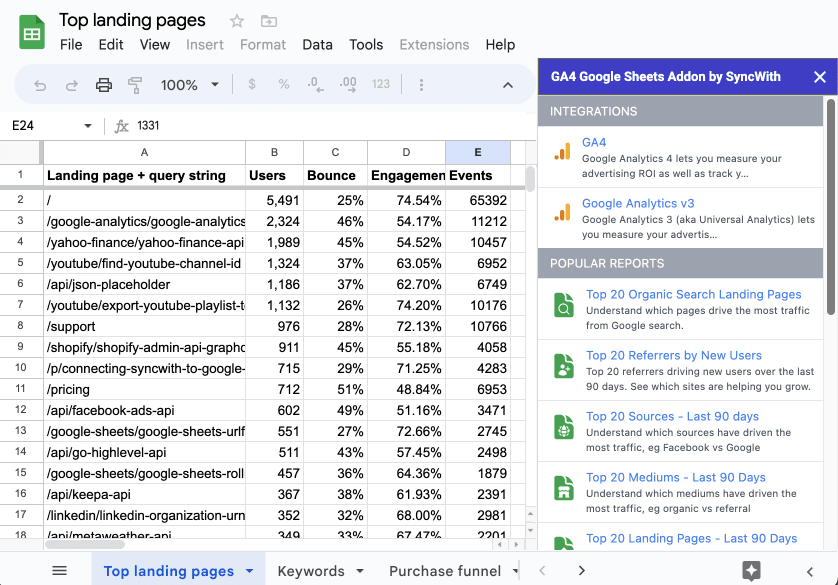
5 out of 5 stars
“Great interface, does what it needs, works with multiple different datasources - wish I'd known about this earlier.”

How do I connect GA4 to Google Sheets?
- Install the GA4 add-on from the Google Workspace Marketplace, then open it from the Extensions menu in any Google Sheet.
- Sign in with the Google account that can see your GA4 property, and pick the property.
- Start from a template, such as Organic Search SEO Overview or Period over Period Traffic Analysis, or build your own report from dimensions like Date, Landing Page and Session Source and metrics like Active Users and Conversions.
- Run it, then schedule it daily, hourly or every 5 minutes so the sheet stays current without you.
You can put many client GA4 properties in one report. In Q3 2026, SyncWith users had 18,254 active Google Analytics reports, and they refreshed successfully 854,141 times.
Integrations
 GA4 Connect the latest google analytics GA4 to Google Sheets, and easily pull all of your website traffic, sessions, users, bounce rate, engagement, landing pages, events, conversions and more into Google Sheets. Segment your data, choose custom dimensions and metrics, and easily setup automated reports so you can stay on top of your marketing efforts
 Google Search Console Pull your SEO data from Google Search Console to Google Sheets to see exactly which keywords your visitors are clicking, and to track position and CTR
Features
You can use the GA4 Google Sheets Addon to quickly and easily build custom reports, and connect all of your Google Analytics websites to Google Sheets to pull in traffic data, track events and conversions to view all of your key metrics in a single spreadsheet.
Reports can be scheduled to update automatically. Once you've pulled data into a spreadsheet you can easily build charts and dashboards. Get all of your data one place, and set it up so you can easily view your performance without logging into multiple dashboards, saving you time and helping you achieve your goals!
5 out of 5 stars
“So much easier to use than the original version made by Google.”
